
3.2 Sources
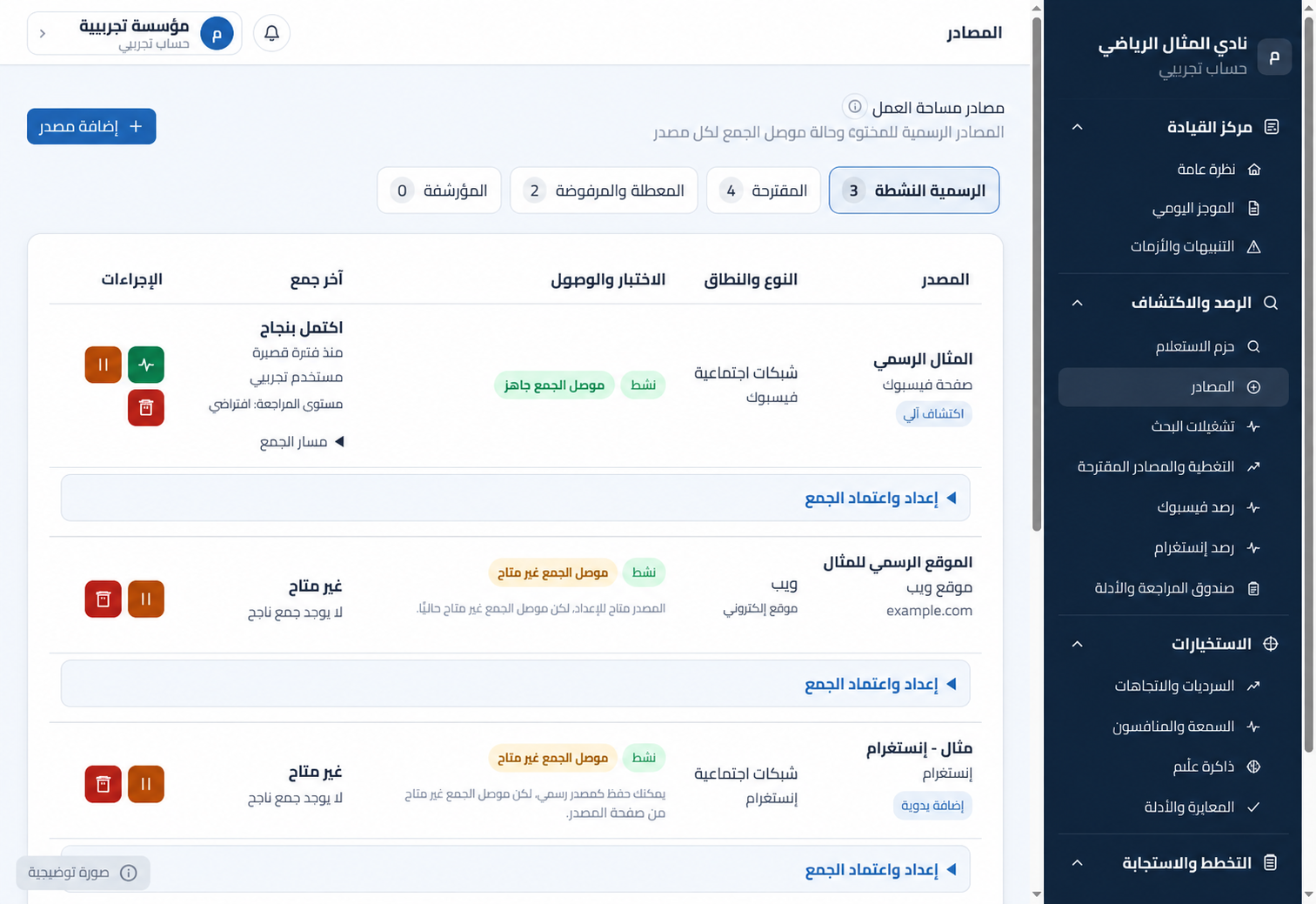
Path: Monitoring and Discovery > Sources. The page shows active official sources, suggested sources, disabled or rejected sources, and archived sources, together with connector status, last collection, and available actions. Figure 4: Official source
Version 1 · Last reviewed 2026-09-24Path: Monitoring and Discovery > Sources. The page shows active official sources, suggested sources, disabled or rejected sources, and archived sources, together with connector status, last collection, and available actions.
Figure 4: Official sources and collection connector status.
Adding an official source
1. Select Add Source.
2. Choose the appropriate source type and connector, such as a public website, Facebook, or Instagram.
3. Enter a clear source name and its full official URL.
4. Check the URL and identity, then save it as an official source.
5. Open Collection Setup and Approval and set the required policy and limits if the connector is available.
State | Meaning and action
Active, collection connector ready | The source may participate in collection under the approved policy.
Active, collection connector unavailable | The source is stored as official, but automated collection is unavailable from this page.
Suggested | Not yet approved; check identity and relevance before activation.
Disabled or rejected | Excluded from current collection; the decision remains in the audit record.
Archived | A historical source outside daily operations.
Do not approve a source merely because its name is similar. Compare the official URL, publisher, platform, and institution identity first.